Sending a comment to MGS
Take Action › Comment to MGS
Sending a comment to MGS.
Midcontinent Grid Solutions — the developer of the proposed BECI 765 kV line — is asking for public comment on the 78 candidate study segmentsThe developer’s own sketch of paths it is considering. A study segment is not a proposed route; MGS says no route has been selected. it published in August. Here is exactly how to send one, three different ways. And how to keep a dated copy of what you said — which is the part that lasts.
Three ways to comment.
MGS is taking comments through three channels, and they are not interchangeable. They reach the company differently, they take different amounts of time, and they leave you with very different records of what you said.
Pick whichever you will actually finish. If a study segment runs on or near land you own, the map is worth the extra fifteen minutes, because it ties what you say to the exact spot you are talking about.
Source · MGS project site, mgs-projects.com/BECI, and the project’s interactive comment map at geovoice.wsp.com/mgs/beci/ (both retrieved Aug. 19, 2026); MGS news release, Aug. 5, 2026What makes a comment count.
MGS’s own map says the segments “are preliminary and subject to change based on landowner input, engineering, surveys, and studies.” Take the company at its word and give it input it cannot generalize away. Specific beats angry, every time.
- Name the segment number. Every candidate segment is numbered on the developer’s map. Ours shows the same 78 segments drawn over the streams, karst, and communities they cross — find your segment number here.
- Say what is actually on that ground. The well and the septic. The barn. The spring. The woodlot you manage. The slope you cannot get a tractor across. The field you irrigate. Detail a stranger in an office could not know is exactly what a comment is for.
- Note the existing corridors near you. Wisconsin law sets an order of priority for siting new transmission: existing utility corridors first, then highway and railroad corridors, before a new corridor is cut. If there is an existing line, highway, or rail corridor near you, say where it is and ask whether it was evaluated.
- Ask for information in writing. A parcel-scale map showing the centerline on your property. The easement width drawn to scale. The proposed structure locations and heights. The construction areas and access roads. Ask for it as a document, not a conversation.
- Say who you are and where you are. A comment that can be placed on a map carries weight an anonymous one does not. What you submit becomes part of the company’s project records — share what you are comfortable having in them. Only the fields the tool marks required are required.
This is the company’s own pre-application outreach, not a regulatory proceeding. Nothing you send through these channels lands in a public docket, and there is no public record of what MGS received or how it answered. That is not a reason to skip it — the company says this input can change the segments, and this is the only window before it picks two routes. It is the reason to keep your own copy of everything.
These are frames, not scripts. A comment in your own words about your own ground carries weight that identical text does not — it cannot be dismissed as a form letter. Use the structure, throw out our sentences.
Method one
Email the project team.
The most useful of the three, because it is the only one that produces a document you hold and a request the company has to answer or visibly not answer. Send it from your own email account — the copy in your sent folder is your record.
- Address it to Connect@MGSWisconsin.com. This is the address MGS publishes for landowners, officials, and community members on its project site. There is also a contact form on the site itself, but email from your own account is better — the form leaves you nothing.
- Put the segment number in the subject line. Something like “Comment on BECI study segment 2 — Town of Clayton, Crawford County.” It makes your comment sortable, and it makes it harder to lose.
- Write the body, or paste a draft from above. Facts about your land, the segment number, and a numbered list of what you want in writing. Numbered requests are answered one at a time; a paragraph of them is answered as a paragraph.
- Ask for written confirmation of receipt. One sentence at the end. If it comes back, save it with the comment.
- Send it, then file your own copy. Save the sent message as a PDF, or print it, and note the date. Keep it with any letters Transource or MGS have already mailed you.
Method two
Fill in their comment card.
MGS calls this its online comment card. It is a short web form, and it is the fastest of the three. One catch matters: when you press submit, the form does not hand you a copy of what you wrote. Write it somewhere else first.
- Write your comment before you open the form. In an email to yourself, or a document, or on paper. This is the whole trick — do it in a place that keeps a copy, then paste it in.
- Open the project site. Go to mgs-projects.com/BECI and look for the comment card link. It opens their form directly: the BECI comment card.
- Fill in who you are and where. Give your name, your contact details, and the town and county. An anonymous comment about an unnamed place is the easiest kind to set aside.
- Paste your comment and name the segment number. Put the number in the first line, so it survives being copied into a spreadsheet.
- Before you submit — save your own copy. Screenshot the completed form, or keep the document you drafted it in. Note the date you submitted.
- Submit it. If a confirmation screen or email appears, save that too.
Method three
Pin a comment to your location on their map.
MGS’s interactive map is the only channel that ties what you say to a specific place on the ground. If a segment crosses or nears land you own, this is the one worth doing. It is also the only one that emails you a receipt, so it leaves you the cleanest record. Allow fifteen to twenty minutes, because it makes you create an account and confirm your email address before it will take a comment. You will not find the tool by searching for it — it is set to stay out of search results — so use the link in step one.
Every screen below is from the tool itself, captured on August 19, 2026. If the tool changes after that date, follow its own on-screen labels. Personal details in the two email screenshots have been blacked out.
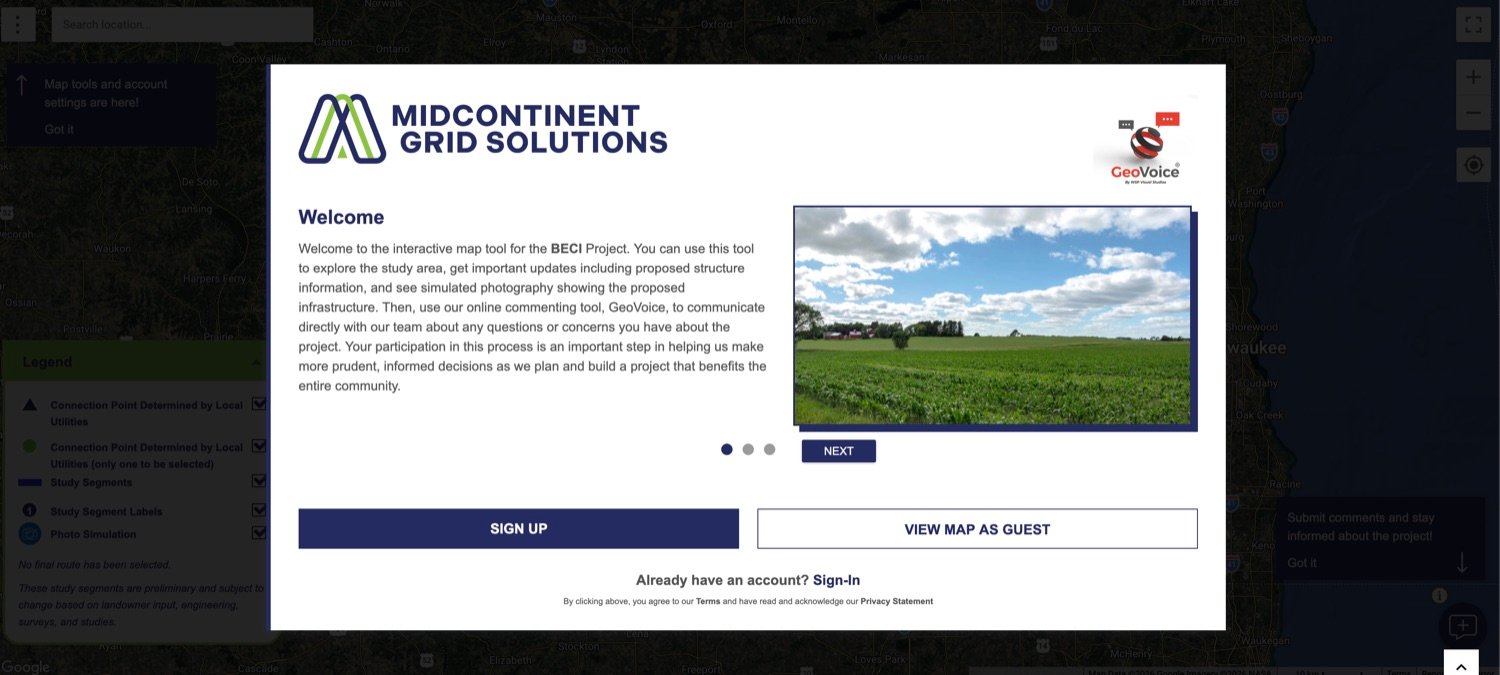
- Open the map. Go to geovoice.wsp.com/mgs/beci/. It is run for MGS by its consultant, WSP, on a tool called GeoVoice; comments submitted there go to the project team. A welcome box opens with two choices: “SIGN UP” or “VIEW MAP AS GUEST”. Guest lets you look around, but it will not let you leave a comment — you can still start there, and it will ask you to make an account the moment you try to comment.
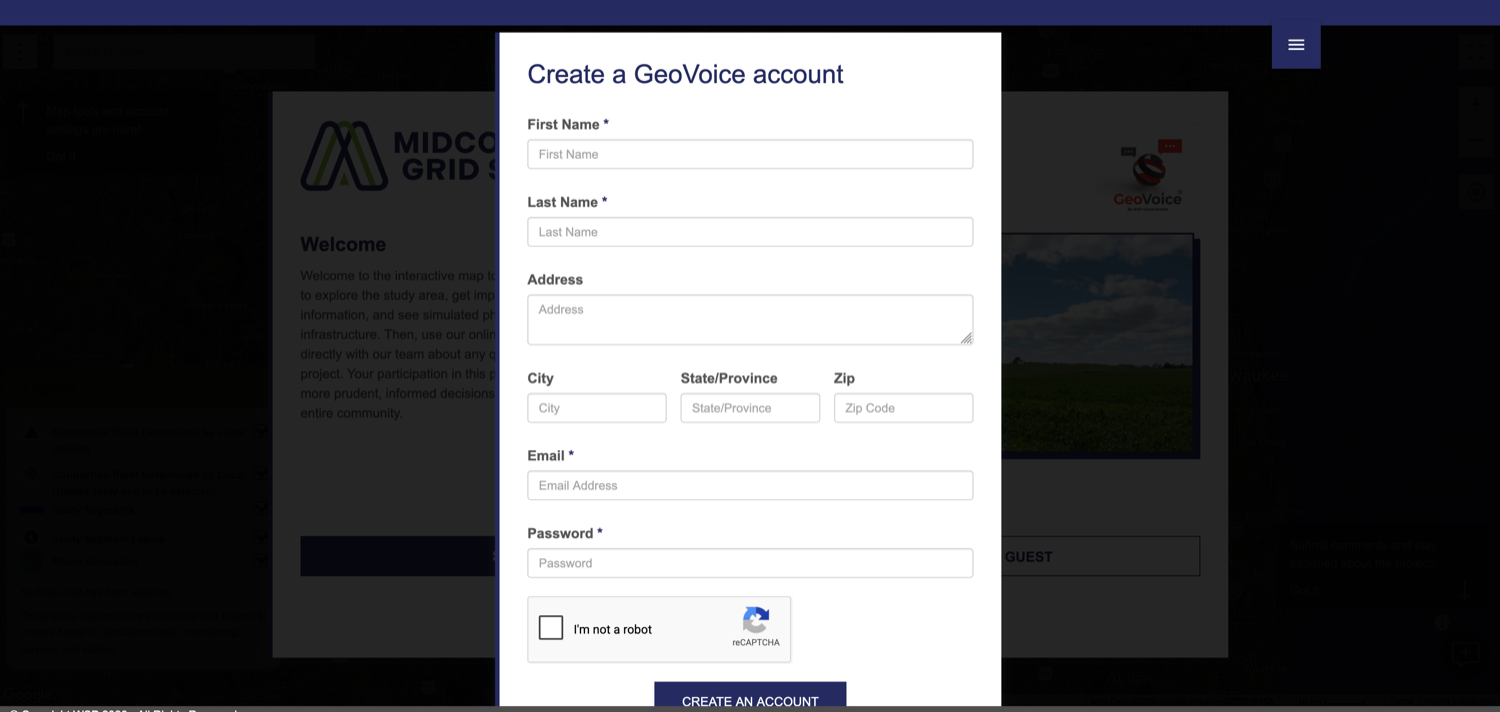
Screenshot · MGS/WSP GeoVoice comment tool, geovoice.wsp.com/mgs/beci/ · captured Aug. 19, 2026 - Fill in the account form. “Create a GeoVoice account” asks for First Name, Last Name, Email and Password — those four are the only required fields. The Address, City, State and Zip boxes are optional, and you do not need them to comment: you will mark the location on the map instead. Check the “I’m not a robot” box and click “CREATE AN ACCOUNT”. Use an address you actually check — everything else depends on it.
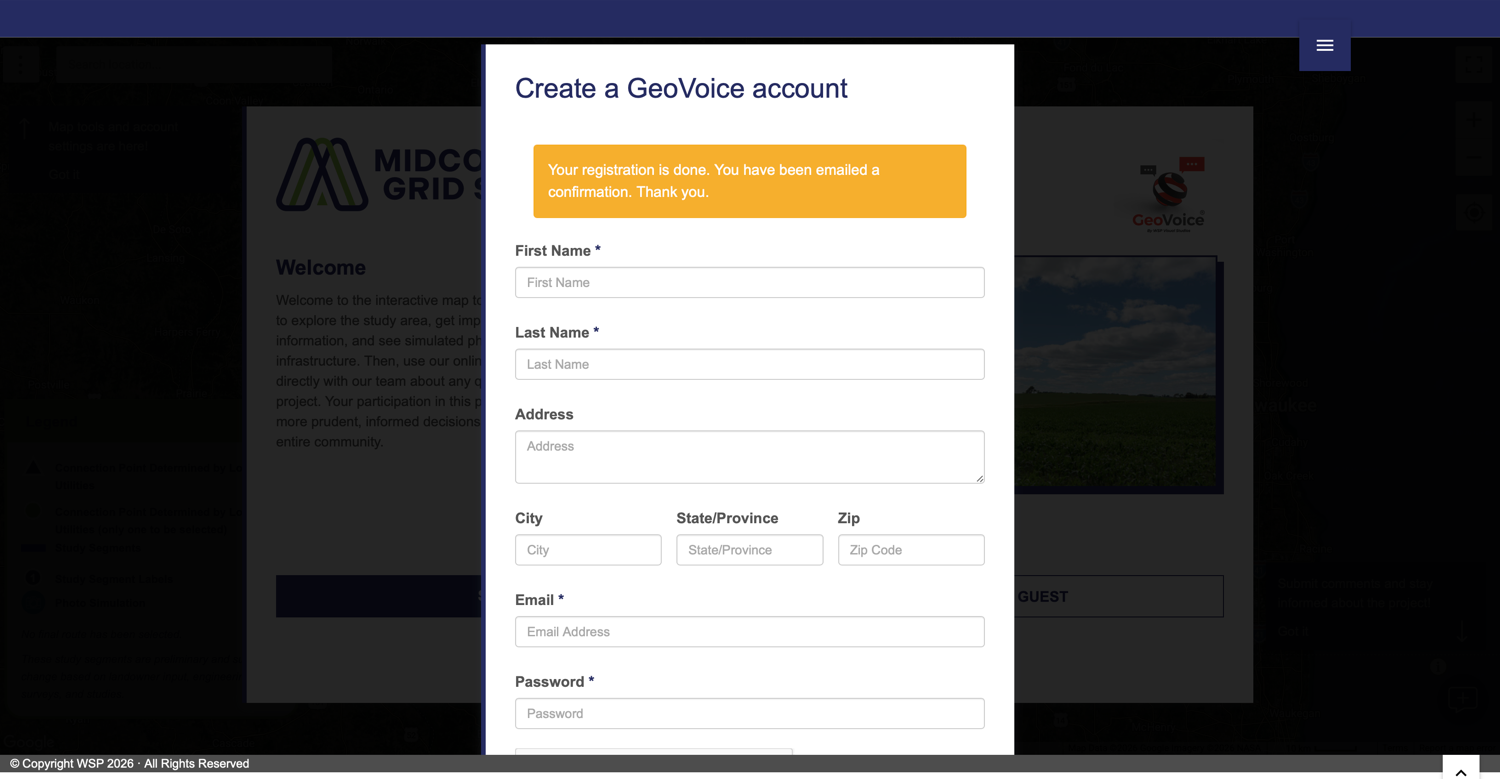
Screenshot · MGS/WSP GeoVoice comment tool · captured Aug. 19, 2026 - Watch for the registration notice. An amber bar appears: “Your registration is done. You have been emailed a confirmation.” You are not finished — the account does not work until you confirm the address.
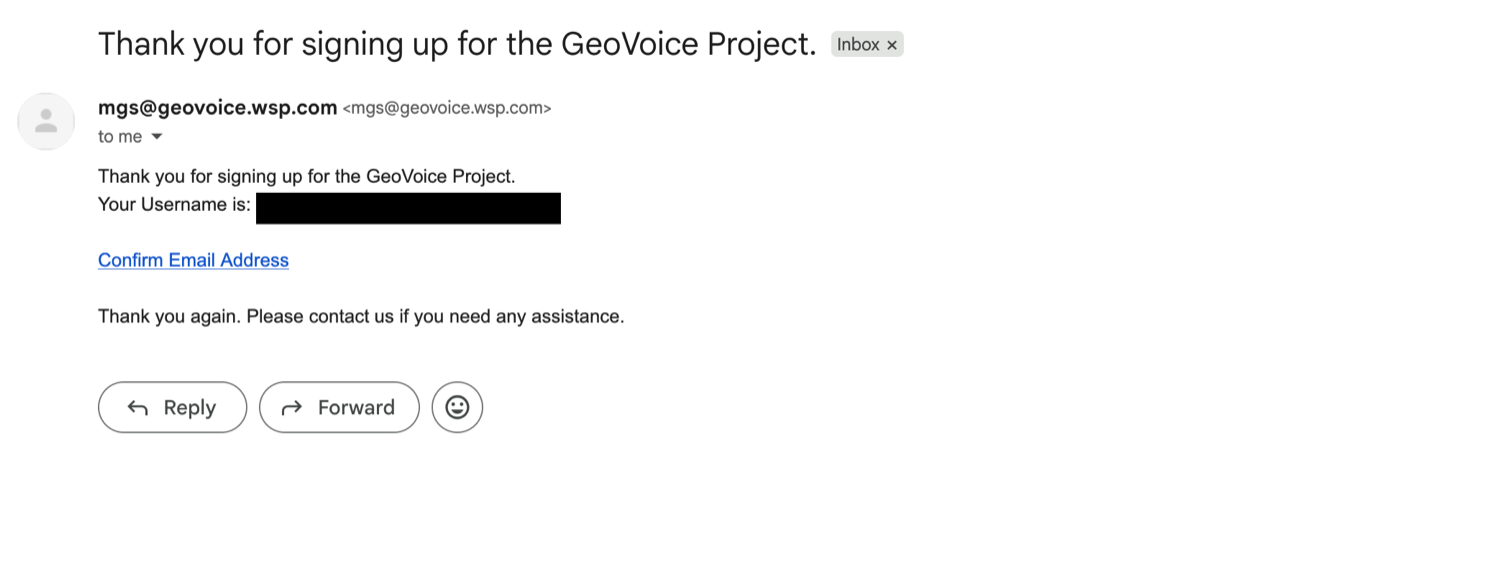
Screenshot · MGS/WSP GeoVoice comment tool · captured Aug. 19, 2026 - Go to your email and find the confirmation. It comes from mgs@geovoice.wsp.com, subject “Thank you for signing up for the GeoVoice Project.” Check your spam or junk folder — this is the step where most people get stuck. Then click “Confirm Email Address”.
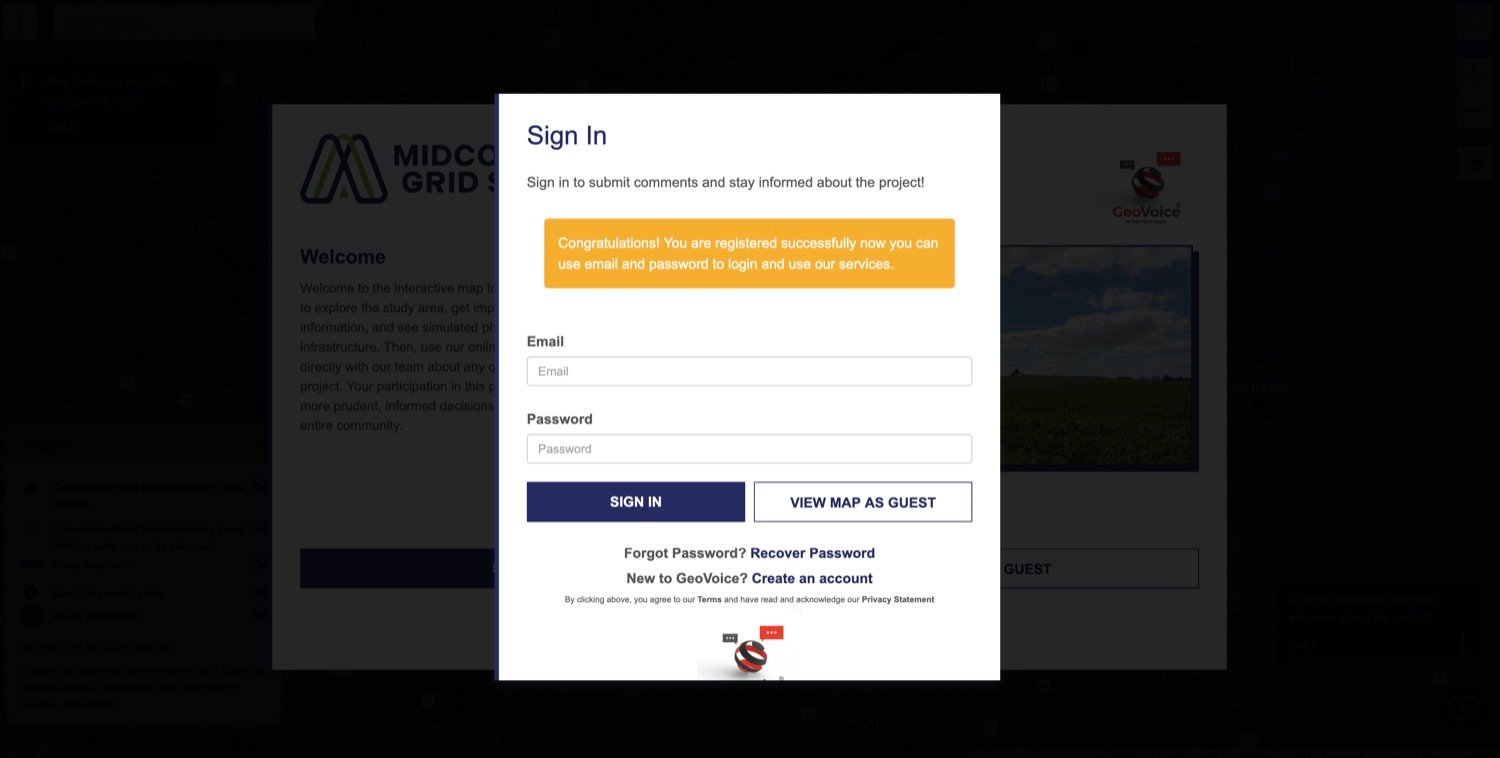
Screenshot · GeoVoice confirmation email · captured Aug. 19, 2026 · username redacted - Sign in. The link takes you back to the map with a sign-in box and the notice “Congratulations! You are registered successfully now you can use email and password to login and use our services.” Enter the email and password you just set and click “SIGN IN”.
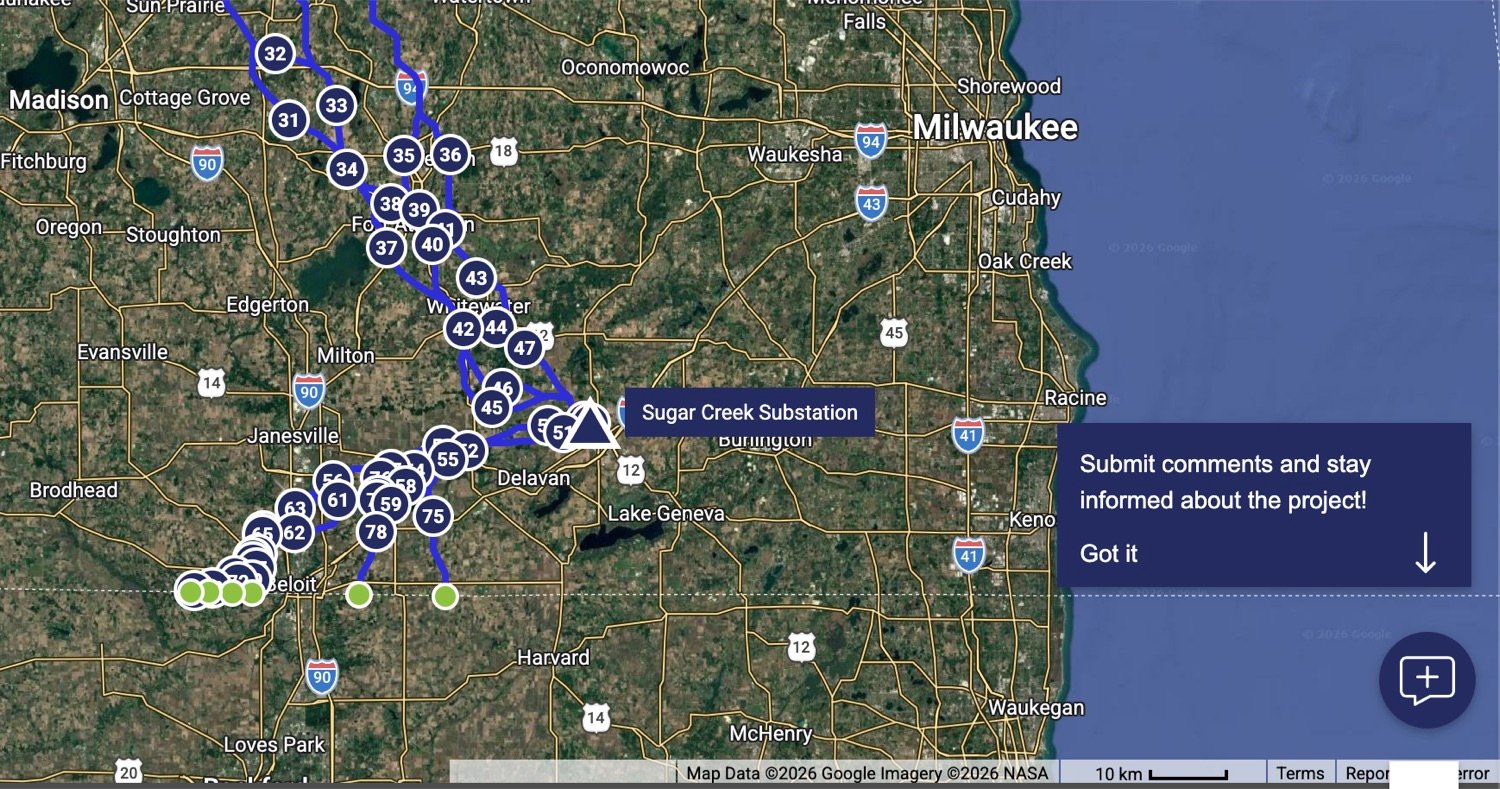
Screenshot · MGS/WSP GeoVoice comment tool · captured Aug. 19, 2026 - Click the comment button. It is the small speech bubble with a plus sign, in the bottom right corner of the map. The tool points at it with a note reading “Submit comments and stay informed about the project!”
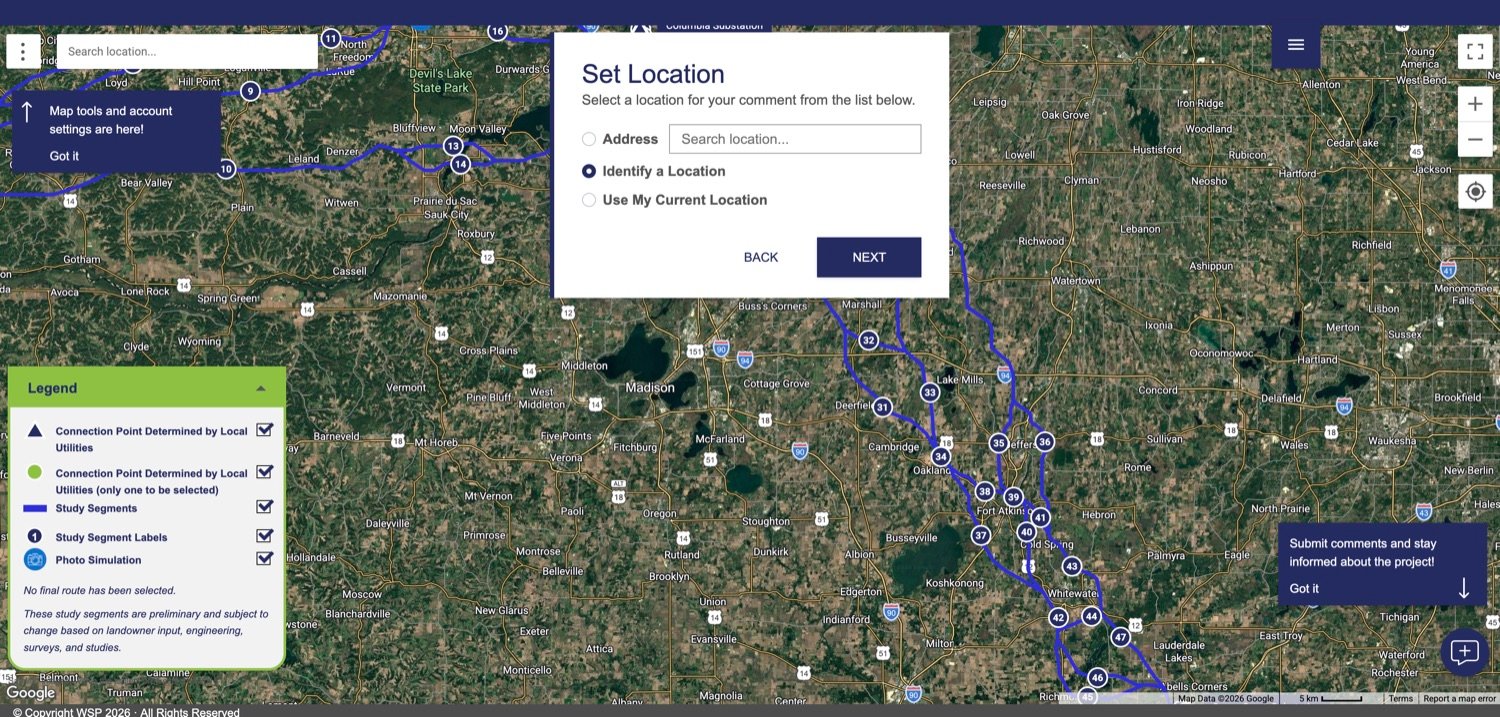
Screenshot · MGS/WSP GeoVoice comment tool · captured Aug. 19, 2026 - Set the location. A “Set Location” box gives you three ways to place the comment: type an Address, choose “Identify a Location” and click the spot on the map yourself, or “Use My Current Location”. Then “NEXT”. Put the pin exactly where your comment is about — the well, the crossing, the field entrance — and check it against the satellite view. The tool’s own warning is that current location is not accurate.
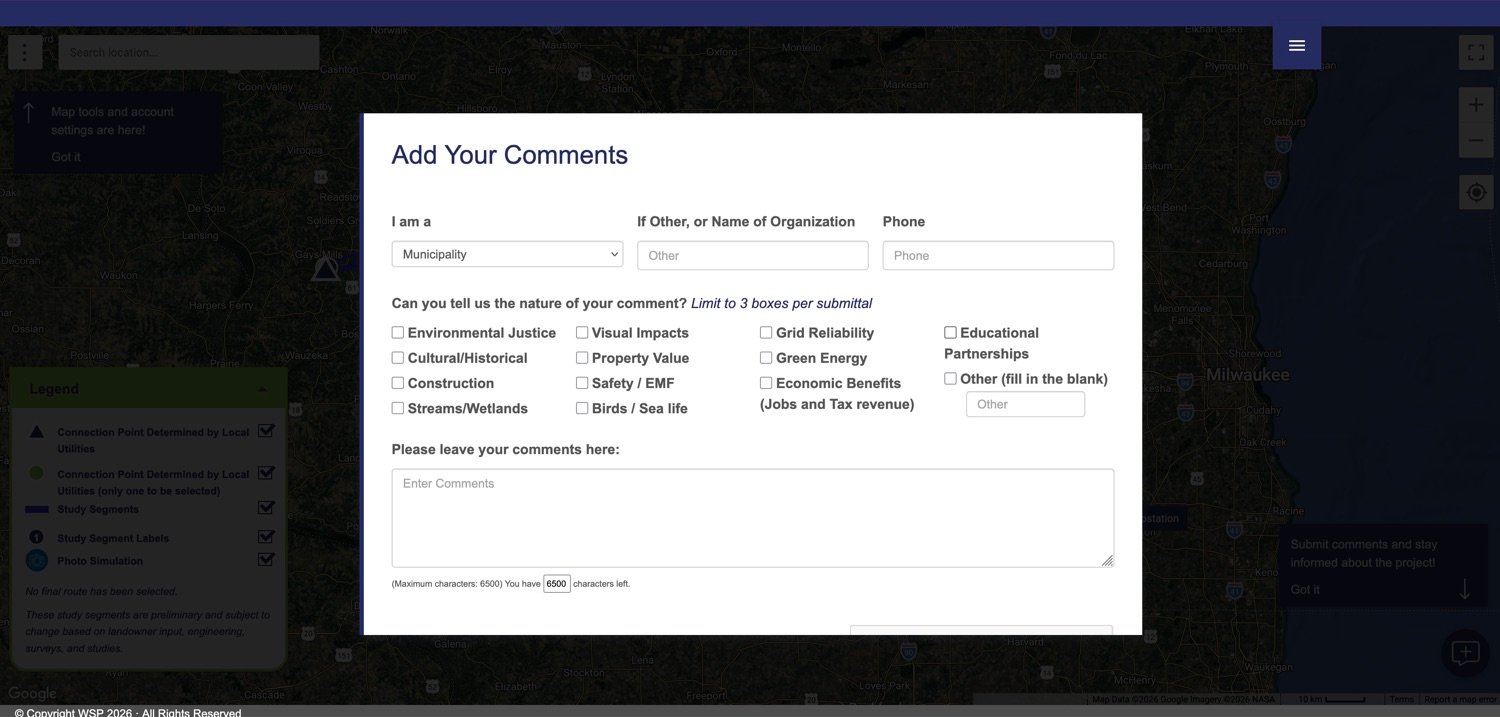
Screenshot · MGS/WSP GeoVoice comment tool · captured Aug. 19, 2026 - Fill in the comment form — and watch the three-box limit. “Add Your Comments” opens with an “I am a” dropdown; set it to what you actually are, because it does not default to you. Organization and phone are optional. Then it asks the nature of your comment across fourteen checkboxes — Property Value, Streams/Wetlands, Safety / EMF, Construction, Cultural/Historical and so on — and limits you to three boxes per submittal, so pick the three that genuinely match your land. The comment box itself takes up to 6,500 characters. Put your segment number in the first line.
Screenshot · MGS/WSP GeoVoice comment tool · captured Aug. 19, 2026 - Submit — and submit again for a second location. You should see “Comment Submitted — Thank you for your input! A receipt of this comment is being emailed to you.” Each comment is tied to the one point you pinned, so if a segment affects two places on your land, use “Submit Another Comment” and pin the second one separately. Otherwise click “FINISH”.
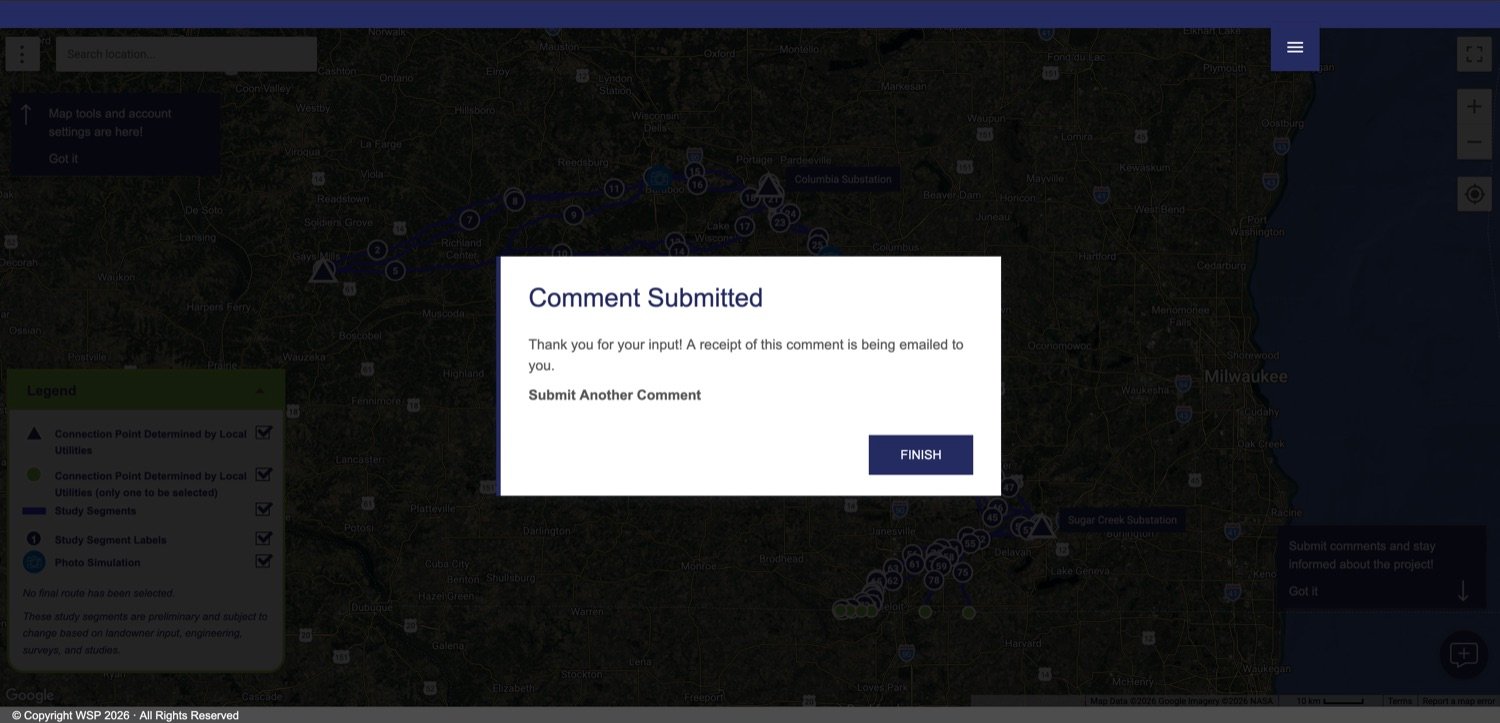
Screenshot · MGS/WSP GeoVoice comment tool · captured Aug. 19, 2026 - Save the receipt email. This is the whole point. It arrives from noreply@mgs-projects.com with the subject “MGS BECI Comment Submission Receipt,” and it lists back what the company recorded: your name, title, email, phone, address, parcel ID, the exact coordinates of your pin, the comment topics you chose, and your comment in full. Note who else is on it — the receipt is addressed to connect@mgswisconsin.com as well as to you, so the same comment lands in MGS’s own inbox. File this email. It is the strongest record any of the three channels gives you: dated, located, and generated by the developer’s own system. If it never arrives, check spam, then send your comment by email instead.
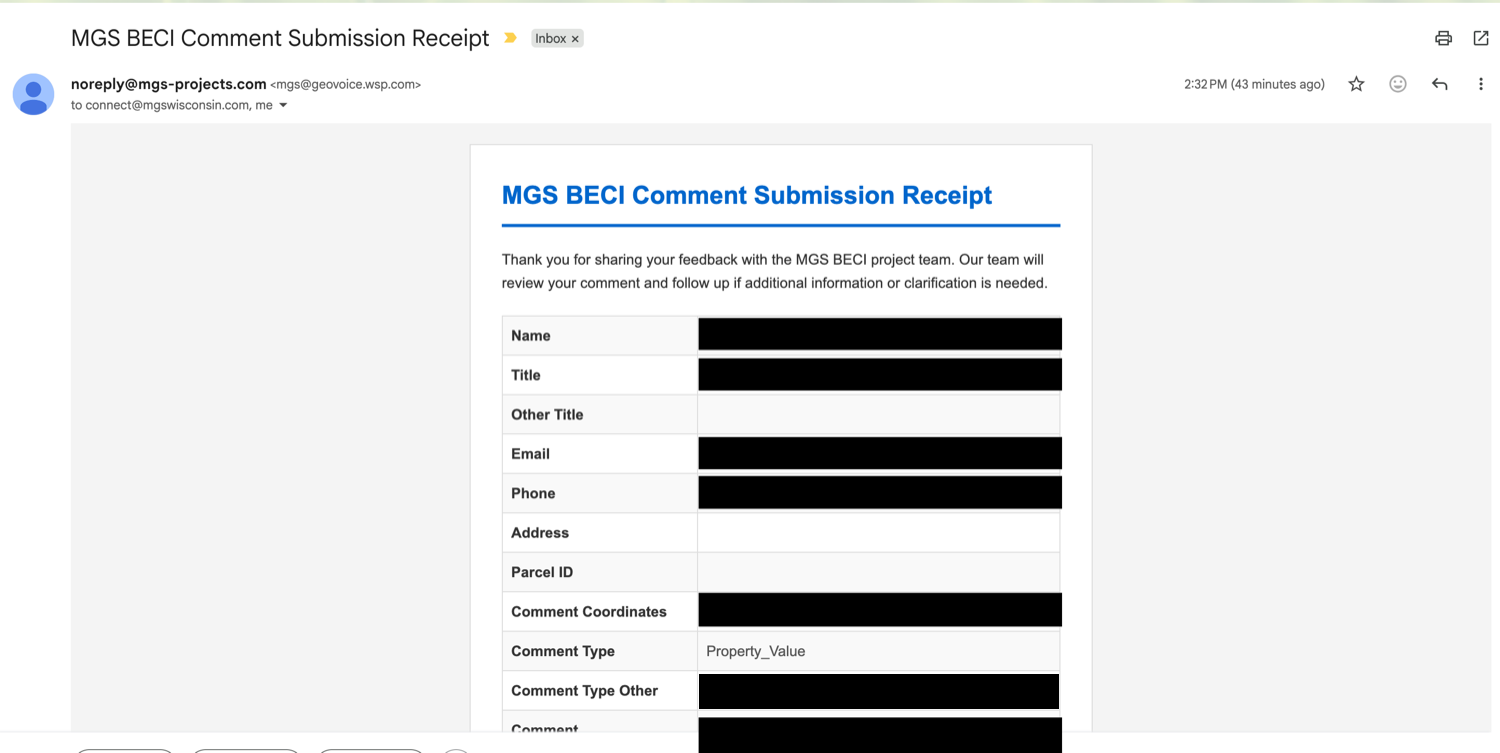
Screenshot · GeoVoice comment receipt · captured Aug. 19, 2026 · name, title, email, phone, coordinates and comment text redacted
If you chose “View map as guest” instead
Guest mode lets you browse the segments freely, and it is a perfectly good way to start. You just cannot comment from it. When you click the comment button in the bottom right corner — the same speech bubble shown in step six — the tool stops you with a sign-in box: “Sign in to submit comments and stay informed about the project!” Click “Create an account” underneath it, and you rejoin the walkthrough above at step two.
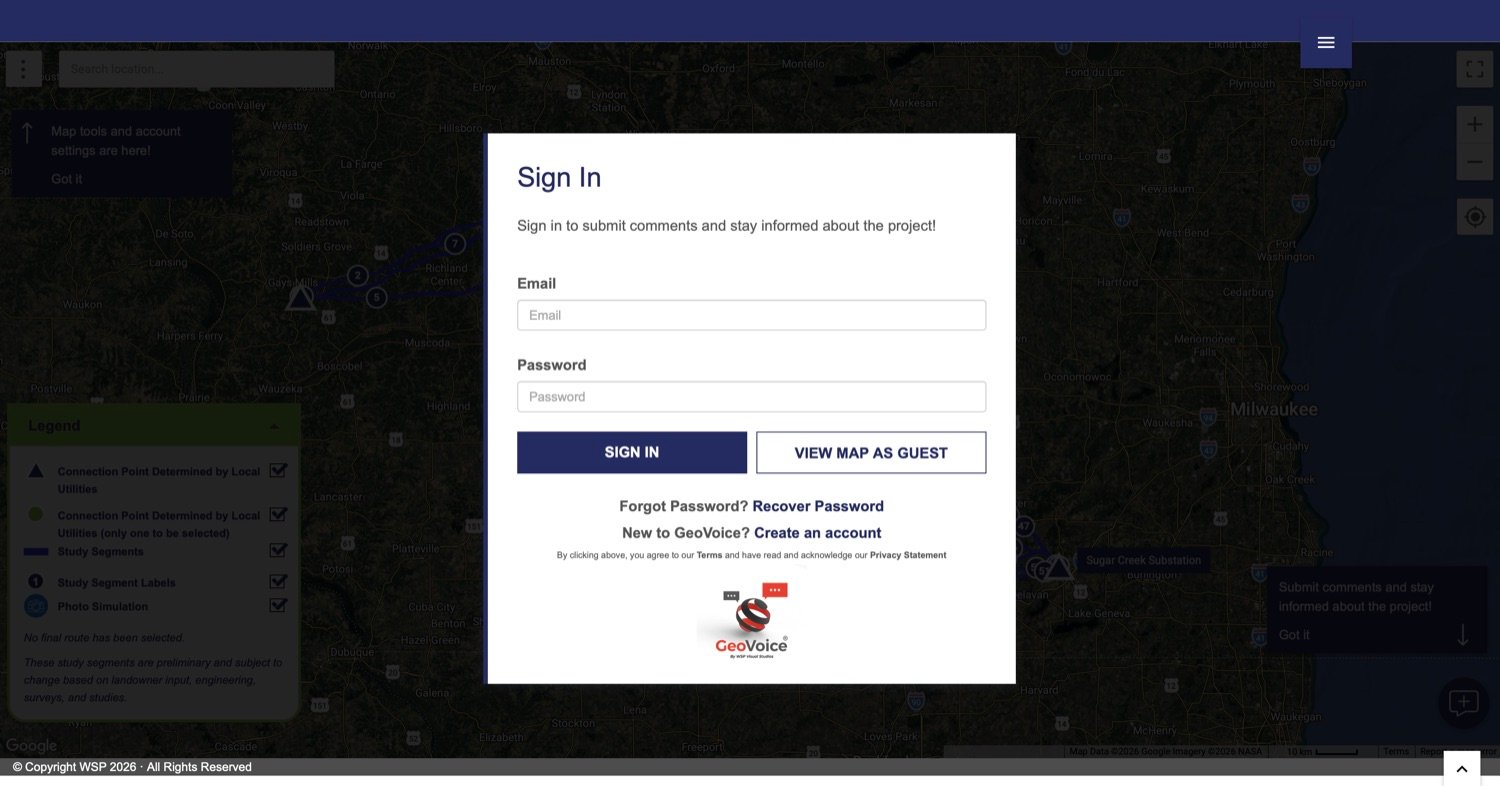
While you are in there, the tool also carries the developer’s own photo simulations and a measuring tool. What it will not show you is what the segments cross — for that, use our corridor map, which draws the same 78 segments over the trout streams, the karst, and the towns.
Source · The project’s interactive comment map, geovoice.wsp.com/mgs/beci/ — on-screen labels and instructions quoted verbatim; the tool’s page carries a noindex tag (retrieved Aug. 19, 2026)A paper comment card at an open house.
Eight open houses ran August 24 to 27, and staff handed out cards to fill in. That round is over. We listed this option last for one reason, and it is the reason to be wary of the next round too: you hand over the only copy that exists.
So protect yourself the same way every time: write out what you want to say beforehand and keep the original. Photograph the card before you hand it in. Note the date, the time, and the name of the person you spoke with. Then send the same points by email, so there is one written trail with your name on it.
That is not cynicism about MGS. It is the same discipline we ask of landowners for every contact with any developer — see the landowner guidance.
Source · MGS project site, mgs-projects.com/BECI (open-house schedule; retrieved Aug. 19, 2026)Keep a record
- Save your sent email as a PDF, or print it.
- Save the receipt the map emails you.
- Keep the document you drafted the comment card in.
- Write down the date you submitted, every time.
- Note who you spoke with, when, and what was said.
- Keep it all with the letters MGS and Transource have mailed you.
Don’t rely on
- A phone call as your only contact.
- Your memory of what a representative told you.
- A paper card you handed over without photographing.
- The company’s inbox as the only place your comment exists.
- A promise that someone will get back to you.
Why the record is the point.
A comment to a developer during its own outreach is not a filing. It sits in a company inbox. Nobody publishes it, nobody indexes it, and no rule requires anyone to tell you what became of it.
What you keep is different. A dated copy of what you told MGS, and when, is something you can use: at an open house when a representative tells you something else; in a follow-up asking why a written request went unanswered; and in early 2027, when MGS files its application with the Public Service CommissionThe state board that decides whether power lines get built. The application it reviews — a Certificate of Public Convenience and Necessity, or CPCN — opens the formal window where the public can comment and intervene. and the formal record opens. What people asked for, and what they were told, becomes part of the story of how this project was routed.
So comment, and keep the copy.
How the state process works → The road to the CPCN →
Please note. This page explains how to take part in a developer’s public comment process. It describes options; it is not legal advice, and it does not tell you what to sign, what to agree to, or what your rights are in any negotiation. For advice about your own situation, consult your own attorney.
A state comment period is open through September 28.
One proceeding is open to public comment right now: the Public Service Commission is taking comments on Wisconsin’s draft 2026–2032 energy plan through Monday, September 28, 2026. It is a different process from the developer’s outreach, and anyone can take part.